Why More Surveyors are Switching to Mobile Dictation Apps

The way surveyors work has changed quite a bit over the years.


BackupTyping is a chartered surveying specialist audio transcription and document production company working with a variety of clients from large corporations to small niche companies, all receiving the same high quality and fast service from a team of audio typists who worked at senior levels in chartered surveying organisations. 

Try us instantly with our FREE dictation app!

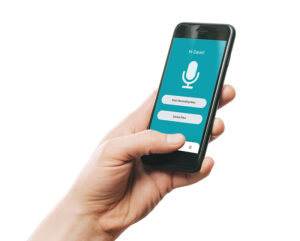
BackupTyping Dictation App built for clients of our specialist property transcription service to use at no charge or licence. Just dictate and send to us at the touch of a button!


Spring Clean Your Admin: How to Reset Your Business Processes for a More Productive Year

Spring is often seen as a time for fresh starts - clearing out the old and making space for something better.

While most people think about spring cleaning at home, it’s just as important for your business and one area that often gets overlooked?

Your admin.

Why Spring Is the Perfect Time to Reset

The first few months of the year can be hectic.  New projects, ongoing work and the pressure of the tax year often mean admin tasks get pushed aside.

By April, many businesses are left with:

Spring offers the perfect opportunity to step back, review what’s working and make improvements before the year gets any busier.

The Hidden Impact of Disorganised Admin

Admin doesn’t just sit quietly in the background, it has a direct impact on how your business runs.

When things start to build up, it can lead to:

Over time, small inefficiencies can turn into bigger problems.

Where to Start Your “Admin Spring Clean”

You don’t need a full overhaul to make a difference. Start with a few key areas:

1. Clear your backlog

If you’ve got notes, recordings, or documents waiting to be typed - deal with them first. Clearing this backlog gives you a clean slate.

2. Review your processes

Are you spending too much time on repetitive tasks? Could anything be streamlined or delegated?

3. Improve turnaround times

Delays in admin often slow everything else down. Faster processing means smoother operations overall.

A Smarter Way to Stay on Top of Admin

For many businesses, the biggest challenge isn’t knowing what needs to be done - it’s finding the time to do it.

That’s where outsourcing can make a real difference.

Instead of admin tasks piling up, you can have them handled quickly and professionally in the background, freeing up your time for higher-value work.

At BackupTyping, we support businesses every day by taking care of:

So you can stay focused on what matters most.

Set Yourself Up for a Stronger Year

Spring is a natural reset point and a small amount of effort now can make the rest of the year run far more smoothly.

If your admin is starting to feel overwhelming, it might be time to rethink how it’s handled.

Start fresh this spring - send us your backlog and let us take care of it.

Or try our service with a free sample and see how much time you could save.

BackupTyping is a chartered surveying specialist audio transcription and document production company working with a variety of clients from large corporations to small niche companies, all receiving the same high quality and fast service from a team of audio typists who worked at senior levels in chartered surveying organisations. 


Try us instantly with our FREE dictation app!

BackupTyping Dictation App built for clients of our specialist property transcription service to use at no charge or licence. Just dictate and send to us at the touch of a button!


Related Articles:

What Is Audio Transcription for Chartered Surveyors?

Fee Earner or Typist? | Why Outsourcing Typing Works


It's just typing right?!

NO … a specialist audio typing service is so much more than that!

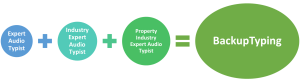
An expert audio typist has been trained how to produce fast and accurate documents from dictation, resulting in a flowing movement over the keyboard and foot pedal - compare it to a talented pianist; fingers flowing smoothly over the keys and a foot rhythmically working the pedal - to produce documents in the most efficient way.

Not only is good practice required but also the ability to interpret what is being said and including adding correct grammar where appropriate without wasting valuable time stopping and starting.

Then better still are the industry expert audio typists.  These typists know and, more importantly, understand what you are saying - not just taking a stab in the dark.

And even better for all property professionals are property industry expert audio typists!  These typists know what dilapidations are and why they are done.  These typists know all about arbitrations and the formal layout required.  These typists can correctly hear and spell building terminology.

Property industry expert audio typists

So we disagree, it is not just a bit of a typing.  A great audio typist just makes it look easy!

Here's another reason to use the services of an experienced audio typist - We Tried Speech to Text - Backup Typing


BackupTyping has a team of property industry expert audio typists ready to get your documents typed and with our clients when you need them.  We work to your timescale, not you to ours.  From 2 hours to 24 hours – what do YOU need?

Simple, easy, cost effective solution – let us make your working life easy.

Recommendation creates opportunity for BackupTyping’s property report transcription services

Backup Typing has been providing property report transcription services for Tuffin Ferraby Taylor for two years. The business needed a robust solution to assist them with peaks in demand for secretarial cover.

The audio typing cover BackupTyping provide was required for a number of reasons – some of the secretarial staff were part-time, cover for normal busier peaks in workload, holiday cover, and, at month-end, the secretarial staff were needed for other duties such as invoicing, which invariably takes them away from typing property reports for a couple of days.

Therefore, flexible support was needed to supplement their secretarial staff with professional transcription services that could be called upon confidentially, quickly and efficiently by all involved in the process.

History of transcription services for Tuffin Ferraby Taylor

Our services to the company came about from a senior member of staff who had used BackupTyping at their previous employment to deal with the same peaks in demand for confidential, quality and rapid turnaround services.

The member of staff very kindly recommended us to Christine Keates-Lewis, the Creative HR & Operations Manager.

As this was a direct recommendation from a colleague Christine was happy to approach BackupTyping having discounted other outsource transcription service companies.

With the events of the last 12 months and a complete change in working environments that has prevailed for many businesses, TFT wanted to enhance their infrastructure knowing that they could rely on the services of BackupTyping for professional, knowledgeable and experienced audio typing requirements.

A changing market requires a fluid approach to property report transcription requirements

This is a very typical outcome of the current changes many businesses are having to make. The unpredictable market means that the sector is requiring a more fluid approach to generating property reports. BackupTyping are able to provide that support with an efficient and dynamic range of services to meet the continued demands of the industry and our clients.

Professional Transcription Service or DIY?

What is the difference between typing yourself and a ‘professional’?


Also known as 'should I use professional transcription service or Fanny Ann down the road?'

If you learnt to type (on a typewriter – let’s not mention age here) it was considered a real skill as it was a bespoke vocation and not everyone knew how to do this.

With the emergence of computers ‘touch typists’ were in demand, non-typists would look in awe as their fingers quickly passed over a keyboard producing accurate documents at speed.

But with the advancement of technology, everyone now knows their QWERTY from their DVORAK and can find their way around a keyboard at varying speeds, even a two-finger user can probably produce fast words (teenagers these days are probably faster typists on mobile phones than a trained typist).

However, using a keyboard and typing are two different things.

Producing words at a fast speed is completely different from producing a well-formatted document.

Professional Documents

If you just need to type an email then formatting is not an issue but if you need even just a short report (let’s not even think about complex reports – well not just yet) the first thing an audio typist will think of is formatting, it’s better to put in place at the beginning than need to format later.

Setting up your document with ‘headings’ which can then be linked to a table of contents should it be needed can save time whilst taking no extra time.

Ensuring headers and footers are linked or unlinked, depending on the document, are all things that can be done with a click of a button whilst typing and are bread and butter for any professional typist.

After all, it is easier to amend a well-formatted document than to start formatting plain text.

Complex Reports

Now as promised, what about complex reports?

So, just dealing with Word because it is more commonly used.

If a mix and match of formatting styles have been used – single line space, one and a half, windows, orphans – the terminology in itself can make your head spin.

But if you know what you’re doing from the outset, you know what to look for it’s easy (like Sunday morning – and at BackupTyping we do work weekends), does the document have inbuilt styles?

If it does this makes all professionals do a little fist pump knowing they just need to follow the set styles.

But for the untrained eye rather than choosing a ‘section heading’, they will just bold the title.

If the inbuilt formatting styles haven’t been followed it could end up taking hours to format something which could be done at the press of a button (well maybe two or three).


Here at BackupTyping, we are not ‘just’ audio typists but experts in Word (and PowerPoint and Excel too).  Add to that our deep understanding and experience of the property industry and its unique terminology, then the answer to the question becomes clear.

For tips on good dictation that your typist will thank you for, check out How to dictate well – your typist will thank you!


BackupTyping provides a fast, accurate and experienced transcription for property professionals – saving you time and money. Call us on 020 7096 1663 to find out how we can help you.

How much is a transcription service?

How Much Does Transcription Cost?

Transcription companies generally all charge per minute of dictation time.

This gives you the ability to calculate your cost instantly.

How Transcription Pricing Works

There are different structures to charging with most offering a 24-hour turnaround of documents as a standard service with the added services of same-day and overnight – all charged at different dictation minute rates.

You do need to check out the pricing structure quite carefully though, as they can look the same until you check how quickly you are getting your documents returned.

Another important consideration when looking at transcription services is to check they specialise in your industry – this really can make the difference in how the service runs and definitely the quality of documents you get back.  This will ensure that outsourcing your typing works for you!

Here at BackupTyping we specialise in property transcription and believe that transcription costs should be clear and transparent to ensure the service remains a cost-efficient solution for our clients.  We look at it a bit differently.  As ex-property secretaries we have always worked on the basis that what is dictated that day needs to hit the postbox/email address that day, so our standard service is Same-Day, giving a quick transcription service.  We do also have an urgent, overnight and 24-hour service of course.

This gives you the ability to choose when you need a document back and know what that charge will be before you have sent it.

Find Out if Transcription is Cost-Effective for You

You will find a free trial generally available, probably with a maximum limit of dictation, allowing your organisation to test out a company so you can rest assured they are as good as they say are!  In practice, most clients are surprised how low the cost is compared to their own time.

We also offer copy typing and document formatting services.

With BackupTyping there are no sign up fees or any hidden costs.

To instantly see our transcription service prices click here.


BackupTyping provides a fast, accurate and experienced transcription for property professionals - saving you time and money. Call us on 020 7096 1663 to find out how we can help you.

Can I dictate on my mobile phone?

Well it depends on what you are looking for as they all effectively do the primary thing that is needed and that’s make recordings, it just depends on what else you want it to do.

Possibly the first consideration is handheld or an app on your smartphone.

The main things to consider before deciding are:

Security

Using a mobile app isn’t a secure way to dictate and share documents to your audio typing company unless you’re using an encrypted paid for service. Free recording apps, Siri and so on don’t protect your data. However, a handheld device means (99% of certified devices) are encrypted or PIN protected or both – super safe.

Battery life

If you rely on your Smartphone to take and receive calls, compose and check emails, take photos for work purposes as well as dictate reports to your audio typist – you might find your phone is needing constant re-charging. Using a dedicated device means your phone can take a break between all of its other tasks. A dedicated device also has a superior battery life in comparison to a smartphone.

Need your dictation urgently

With an app-based system, you also have the benefit of being able to send your files immediately either to your secretary or outsource typing facility to enable your dictation to be transcribed immediately rather than needing to wait to ‘dock’ back in the office. Some hand-held devices also now have Wi-Fi capabilities so this is no longer the domain only of the smartphone app.

There is of course benefits to using an app – including but not limited to:

Only needing to carry one device as opposed to multiple.

A dedicated device may be slight overkill for someone who doesn’t dictate very often.

Equally, if you are dictating very long files you would need to keep an eye on the battery life.

If you’ve made the decision to opt for a handheld device now you face the task of trying to figure out which of the dozens of machines is the right one for you so check out our article 'Which dictation machine is the best?'

BackupTyping provides a fast, accurate and experienced transcription service for property professionals - saving you time and money. Call us on 020 7096 1663 to find out how we can help you.

How to Dictate Well – Your Typist Will Thank You!

How to dictate for business is rarely taught but is a real skill and just takes a little practice for great rewards.

Once it is mastered you will love it.

It can make your life easier and free up time wasted doing tasks that can be done for you (no doubt quicker and maybe even better).

Your typist should be an expert at Word and Excel as a minimum – you don’t have to be!

Benefits of dictating well

A ‘pick and peck’ typist will achieve (on average) 20 words per minute.

A professional typist can exceed 100wpm – meaning it can be up to 5 times faster than trying to type yourself.

At around 20wpm, a 3,000 word or roughly 6 page word report will take a minimum of 2.5 hours.  Dictating this will take 30 minutes.

The faster you can create a document, the more you can do in a day.

See our article on Why dictate? I can just type it myself!

How to dictate for your audio typist

Make sure your dictation machine is charged and you are familiar with the record and pause buttons (pop some spare batteries in your briefcase too).

Know how to download your speech file once you have finished dictating so it can be typed.

1. Ensure ‘rec’ has started before speaking.

2. Take care when pressing Pause and Record so you do not 'clip' the first or last words of a sentence.
This is a common problem and can mean you don't get accurate documents back!
Try taking a short breath after pressing record and before starting to talk.

3. Use the pause not stop button – this will just pause the file you are working on while you consider what to say next.  Stop may well start another file which is going to be annoying later.

4. Hold the dictation machine about two inches away from mouth to get the clearest speech.

5. Don't turn your head away from the microphone while speaking as your voice will fade in and out.

6. Don't rustle through papers while speaking – it’s just harder to hear exactly what you are saying.

7. Speak clearly but don’t change your normal speech pattern – just speak at a normal pace and level.  Fast dictation won't get your typing done any quicker (and could slow it down) and it may make your typist shed a tear or two.

8. Enunciate numbers clearly – 13 and 30 are very different numbers – say “thirteen one three” or “thirty-three zero”.

9. Spell any unusual names/words - Llanfairpwllgwyngyllgogerychwyrndrobwllllantysiliogogogoch "L for Lima, L for Lima, A for Apple, N for November, you get the point.

10. Do speak with emotion in your voice. A monotone voice tends to put typists to sleep.

11. Remember to pause recording when thinking for a while or taking a telephone call.

12. Heavy wind can drown out your dictation - consider using a specialist dictation machine with a microphone facility that removes this (contact BackupTyping for advice on this). Or turn your back to the wind. 

13. Consider background noise so you get the best-typed document back. A professional typist can handle a lot though - you definitely don't have to sit in silence.

14. Please do not eat while dictating. Just no, it’s not nice.

15. Do not dictate while driving. It's dangerous and the sound quality is usually poor.

Practice on your own in a quiet room until you feel confident with your recording machine.  Don’t feel like you have to whisper, just talk as if you were on the telephone.

While you get comfortable with dictating consider before you start talking about what you would like to cover in your document.  It’s nice and easy to start by dictating the name and address of the recipient and “Dear Whoever”, “subject line”, “thank you for your letter of…” and then you are on your way.

Whether you have an in-house typist or work with a company like BackupTyping providing a transcription service, remember there is a real person who will be doing your typing, so it’s kind of nice to start your dictation with ‘Hello, Mark here, dictating on Monday’.  It is easier to imagine you are talking to ‘somebody’ rather than a machine.

BackupTyping provides a fast, accurate and experienced transcription for property professionals - saving time and money. Call us on 020 7096 1663 to find out how we can help you.

Which Transcription Service? Specialist versus Non-Specialist

If you’ve looked into outsourcing transcription, you will have come across a wide range of providers.  Some cover multiple industries. Others specialise in just one.

So, which is the better option?

What Is a Specialist Transcription Service?

A specialist transcription service focuses on one particular industry and understands it well.

For example:

This means they are familiar with:

They do not need to learn as they go.

Why Industry Knowledge Matters

Transcription is not just about typing words it also involves understanding what is being said.

In the property sector, this can include:

A specialist transcription service will recognise these immediately - they will know what you mean without needing clarification, which makes the process quicker and more accurate.

Risks of Using a Non-Specialist

A non-specialist service may still be able to type your dictation, but there can be drawbacks.

These include:

This is something we see regularly when clients switch to us.  Often, the document has been typed correctly in parts but lacks the consistency and understanding needed for professional use.

If you are unsure what goes into producing a well-structured document, it is worth understanding the role of an audio typist and how much more is involved than simply typing.

Benefits of a Property-Focused Transcription Service

Using a specialist service in your industry offers clear advantages.

Accuracy from the Start: There is no need to explain terminology or correct misunderstandings.

Consistent Document Quality: Reports are formatted correctly and follow expected structures.

Faster Turnaround: Less time is spent questioning or second-guessing content.

Easier Workflow: You can dictate naturally, without worrying about how something could be interpreted.

At BackupTyping, our team has worked within the property industry for many years and we understand the types of documents you produce and the standards expected, which allows us to deliver work that is ready to use.

How to Choose the Right Transcription Provider

When selecting a transcription service, consider:

Choosing the right provider from the start will save time and avoid frustration later.

Conclusion

While many transcription services can type your dictation, not all will understand it.

A specialist transcription service offers greater accuracy, consistency and efficiency, particularly in technical industries such as property.  If you are looking for a reliable solution that fits seamlessly into your workflow, working with a specialist provider makes a clear difference.

For a broader understanding of how this fits into your day-to-day work, see our guide to audio transcription for chartered surveyors.

If you are preparing property reports and considering outsourcing transcription - you need a service that understands your industry, BackupTyping can help.  Send us your dictation and see the difference a specialist service can make.

BackupTyping provides a fast, accurate and experienced transcription for property professionals - saving you time and money. Call us on 020 7096 1663 to find out how we can help you.