What Is Transcription? A Complete Guide for Property Professionals

Transcription is a simple concept, but in practice it plays a critical role in how many businesses operate.  If you dictate notes, reports or correspondence, transcription is what turns those spoken words into structured, usable documents.

For property professionals and surveyors, it is often the difference between a slow, admin-heavy workflow and an efficient, streamlined one.

What Is Transcription?

Transcription is the process of converting spoken audio into written text.

In a business context, this typically involves:

  • Dictating reports or notes
  • Recording meetings or site observations
  • Converting audio into a structured document

The final output is not just text.  It is usually:

  • Formatted
  • Proofread
  • Ready to send or use

For a more practical overview of how this works in your industry, see our guide to audio transcription for chartered surveyors.

How Transcription Works in Practice

The process is straightforward:

  1. Dictate your content using a phone, app, or recorder
  2. Send the audio file
  3. A professional transcriptionist types and formats the document
  4. You receive a completed, ready-to-use document

No need to type.  No need to format.

Types of Transcription

1. Audio Transcription

This is the most common type.

Used for:

  • Reports
  • Letters
  • Site notes
  • General correspondence

2. Meeting Transcription

Used when:

  • Recording Teams or Zoom meetings
  • Creating written records of discussions

3. Copy Typing

Not strictly transcription, but closely related.

This involves:

  • Converting handwritten or typed documents
  • Reformatting existing files into professional layouts

Who Uses Transcription Services?

Transcription is widely used across industries, but particularly by:

Property Professionals and Surveyors

  • Site inspections generate large volumes of notes
  • Reports need to be structured and accurate
  • Time is better spent on inspections than typing

Businesses with Regular Documentation

  • Letters
  • Reports
  • Internal documentation

Teams with Limited Admin Capacity

  • Busy periods create backlogs
  • Outsourcing provides flexibility

Why Not Just Type It Yourself?

Most professionals can type but the real question is ... is it the best use of your time?

Typing documents yourself:

  • Takes significantly longer
  • Interrupts your workflow
  • Reduces time spent on core work using your professional knowledge

If you are weighing this up, it is worth reading fee earner or typist to understand the real cost of doing it yourself.

Transcription vs Speech-to-Text

Speech-to-text tools are becoming more common but they are not the same as professional transcription.

Speech-to-Text:

  • Fast
  • Low cost
  • Often requires editing

Professional Transcription:

  • Accurate
  • Properly formatted
  • Ready to use

Speech-to-text can be useful for quick notes but for structured, client-facing documents, it often requires significant correction.

The Benefits of Professional Transcription

Using a transcription service provides:

Time Savings: Dictation is significantly faster than typing.

Accuracy: This is especially important for technical terminology.

Professional Formatting: Documents are structured, consistent, and ready to send.

Flexibility: You can scale up or down depending on workload.

Reduced Admin Pressure: This frees up both professionals and admin staff.

How Transcription Fits into a Modern Workflow

Today, transcription is part of a much more efficient process.

With mobile dictation:

  • Record on-site
  • Send instantly
  • Receive documents quickly

No need to return to the office and no delays in getting reports started.

Common Misconceptions

“It’s just typing”

Transcription involves:

  • Listening carefully
  • Understanding context
  • Applying formatting
  • Producing structured documents

“It’s expensive”

In reality:

  • You only pay for what you use
  • It often saves money by freeing up higher-value time

“Speech-to-text does the same thing”

It does not account for:

  • Context
  • Formatting
  • Accuracy in real-world conditions

Conclusion

Transcription is more than converting speech into text.

It is a way to:

  • Save time
  • Improve efficiency
  • Produce professional documents
  • Reduce admin workload

For property professionals, it is often a key part of working more effectively.

If you are dictating but still typing your own work or relying on inconsistent processes, BackupTyping can help.  Send your dictation today and receive a fully formatted document in return.

BackupTyping is here to provide you with the best transcription service possible when you need it.

BackupTyping provides a fast, accurate and experienced transcription for property professionals - saving you time and money. Call us on 020 7096 1663 to find out how we can help you.

How to Dictate Well – Your Typist Will Thank You!

How to dictate for business is rarely taught but is a real skill and just takes a little practice for great rewards.

Once it is mastered you will love it.

It can make your life easier and free up time wasted doing tasks that can be done for you (no doubt quicker and maybe even better).

Your typist should be an expert at Word and Excel as a minimum – you don’t have to be!

Benefits of dictating well

A ‘pick and peck’ typist will achieve (on average) 20 words per minute.

A professional typist can exceed 100wpm – meaning it can be up to 5 times faster than trying to type yourself.

At around 20wpm, a 3,000 word or roughly 6 page word report will take a minimum of 2.5 hours.  Dictating this will take 30 minutes.

The faster you can create a document, the more you can do in a day.

See our article on Why dictate? I can just type it myself!

How to dictate for your audio typist

Make sure your dictation machine is charged and you are familiar with the record and pause buttons (pop some spare batteries in your briefcase too).

Know how to download your speech file once you have finished dictating so it can be typed.

1. Ensure ‘rec’ has started before speaking.

2. Take care when pressing Pause and Record so you do not 'clip' the first or last words of a sentence.
This is a common problem and can mean you don't get accurate documents back!
Try taking a short breath after pressing record and before starting to talk.

3. Use the pause not stop button – this will just pause the file you are working on while you consider what to say next.  Stop may well start another file which is going to be annoying later.

4. Hold the dictation machine about two inches away from mouth to get the clearest speech.

5. Don't turn your head away from the microphone while speaking as your voice will fade in and out.

6. Don't rustle through papers while speaking – it’s just harder to hear exactly what you are saying.

7. Speak clearly but don’t change your normal speech pattern – just speak at a normal pace and level.  Fast dictation won't get your typing done any quicker (and could slow it down) and it may make your typist shed a tear or two.

8. Enunciate numbers clearly – 13 and 30 are very different numbers – say “thirteen one three” or “thirty-three zero”.

9. Spell any unusual names/words - Llanfairpwllgwyngyllgogerychwyrndrobwllllantysiliogogogoch "L for Lima, L for Lima, A for Apple, N for November, you get the point.

10. Do speak with emotion in your voice. A monotone voice tends to put typists to sleep.

11. Remember to pause recording when thinking for a while or taking a telephone call.

12. Heavy wind can drown out your dictation - consider using a specialist dictation machine with a microphone facility that removes this (contact BackupTyping for advice on this). Or turn your back to the wind. 

13. Consider background noise so you get the best-typed document back. A professional typist can handle a lot though - you definitely don't have to sit in silence.

14. Please do not eat while dictating. Just no, it’s not nice.

15. Do not dictate while driving. It's dangerous and the sound quality is usually poor.

Practice on your own in a quiet room until you feel confident with your recording machine.  Don’t feel like you have to whisper, just talk as if you were on the telephone.

While you get comfortable with dictating consider before you start talking about what you would like to cover in your document.  It’s nice and easy to start by dictating the name and address of the recipient and “Dear Whoever”, “subject line”, “thank you for your letter of…” and then you are on your way.

Whether you have an in-house typist or work with a company like BackupTyping providing a transcription service, remember there is a real person who will be doing your typing, so it’s kind of nice to start your dictation with ‘Hello, Mark here, dictating on Monday’.  It is easier to imagine you are talking to ‘somebody’ rather than a machine.

BackupTyping provides a fast, accurate and experienced transcription for property professionals - saving time and money. Call us on 020 7096 1663 to find out how we can help you.

Which Transcription Service? Specialist versus Non-Specialist

If you’ve looked into outsourcing transcription, you will have come across a wide range of providers.  Some cover multiple industries. Others specialise in just one.

So, which is the better option?

What Is a Specialist Transcription Service?

A specialist transcription service focuses on one particular industry and understands it well.

For example:

This means they are familiar with:

They do not need to learn as they go.

Why Industry Knowledge Matters

Transcription is not just about typing words it also involves understanding what is being said.

In the property sector, this can include:

A specialist transcription service will recognise these immediately - they will know what you mean without needing clarification, which makes the process quicker and more accurate.

Risks of Using a Non-Specialist

A non-specialist service may still be able to type your dictation, but there can be drawbacks.

These include:

This is something we see regularly when clients switch to us.  Often, the document has been typed correctly in parts but lacks the consistency and understanding needed for professional use.

If you are unsure what goes into producing a well-structured document, it is worth understanding the role of an audio typist and how much more is involved than simply typing.

Benefits of a Property-Focused Transcription Service

Using a specialist service in your industry offers clear advantages.

Accuracy from the Start: There is no need to explain terminology or correct misunderstandings.

Consistent Document Quality: Reports are formatted correctly and follow expected structures.

Faster Turnaround: Less time is spent questioning or second-guessing content.

Easier Workflow: You can dictate naturally, without worrying about how something could be interpreted.

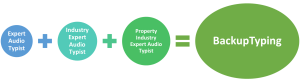
At BackupTyping, our team has worked within the property industry for many years and we understand the types of documents you produce and the standards expected, which allows us to deliver work that is ready to use.

How to Choose the Right Transcription Provider

When selecting a transcription service, consider:

Choosing the right provider from the start will save time and avoid frustration later.

Conclusion

While many transcription services can type your dictation, not all will understand it.

A specialist transcription service offers greater accuracy, consistency and efficiency, particularly in technical industries such as property.  If you are looking for a reliable solution that fits seamlessly into your workflow, working with a specialist provider makes a clear difference.

For a broader understanding of how this fits into your day-to-day work, see our guide to audio transcription for chartered surveyors.

If you are preparing property reports and considering outsourcing transcription - you need a service that understands your industry, BackupTyping can help.  Send us your dictation and see the difference a specialist service can make.

BackupTyping provides a fast, accurate and experienced transcription for property professionals - saving you time and money. Call us on 020 7096 1663 to find out how we can help you.

Who needs a transcription service?

If you dictate notes, reports, or correspondence, then you already rely on transcription whether you realise it or not.

The real question is not whether you need a transcription service ... it’s whether you are using your time efficiently.

What Is a Transcription Service?

A transcription service converts spoken words into professionally formatted written documents.  For a more detailed breakdown, see our guide to audio transcription for chartered surveyors.

For property professionals and chartered surveyors, this typically includes:

Instead of typing everything yourself, you dictate and a professional audio typist produces the final document.


Who Actually Needs a Transcription Service?

1. Professionals Who Dictate Regularly

If you are already dictating into:

Then you are already halfway there.

Typing your own dictation removes the biggest benefit - time saving.

2. Chartered Surveyors and Property Professionals

Surveyors spend a large part of their day:

Typing reports is not the best use of that time.

A transcription service allows you to:

Without returning to the office to type.

3. Businesses Experiencing Capacity Issues

Workloads are rarely consistent.

During busy periods:

Outsourcing transcription gives you:

4. Teams with In-House Secretaries

A common assumption is "our secretary can type it”

But in reality secretaries are responsible for:

Typing large volumes of dictation can reduce their effectiveness elsewhere.

A transcription service allows:
Secretaries to focus on higher-value tasks
Typing to be handled efficiently in the background

5. Anyone Who Wants to Work More Efficiently

Even if you can type your own work you should ask is it the best use of your time?

For example:

That time difference adds up quickly.

If you've ever wondered how much time (and money) typing actually costs, read fee earner or typist?.


Why Not Just Use Speech-to-Text?

Speech-to-text tools can work for simple tasks.  However, they often struggle with:

This leads to:

Which removes much of the “time saving”.


The Real Value of a Transcription Service

A professional transcription service doesn’t just type, it provides:

And most importantly it allows you to focus on your core work.


A Simple Workflow

Working with a transcription service is straightforward:

  1. Dictate
  2. Send your file
  3. Receive a completed document

Conclusion

Anyone who dictates can benefit from a transcription service.

But for professionals - especially in the property sector - the real advantage is not just convenience.

It’s efficiency
It’s cost-effectiveness
It’s better use of time


If you are currently typing your own reports or struggling to keep up with admin send us your dictation today - we’ll take care of the rest.

BackupTyping provides a fast, accurate and experienced transcription for property professionals - saving you time and money.  Call us on 020 7096 1663 to find out how we can help you. 


Further Reading: