Struggling to Format Photographic Schedules of Condition?

Photographic schedules of condition are essential in building surveying but producing them can be time-consuming and repetitive.

Formatting images, maintaining consistency and handling revisions can quickly take up valuable time that could be better spent on surveying work.

The Challenge with Creating Photo Schedules

Many professionals still create schedules manually using Word or PowerPoint, which often leads to:

This becomes even more challenging when dealing with large schedules containing hundreds of images.

Why Word Is Better - But Still Time-Consuming

While Word is the preferred tool for creating photographic schedules, it still requires:

Even with the right tools, producing a high-quality schedule can take far longer than expected.

Let BackupTyping Handle It for You

At BackupTyping, we take the pressure off by producing fully formatted photographic schedules of condition for you.

We work with:

Our service helps you:

What Makes Our Service Different?

We understand exactly what surveyors need - and we deliver it efficiently and reliably.

Ready to Save Time?

If you regularly produce photographic schedules of condition, outsourcing could significantly improve your workflow.

Send us your images and notes - we’ll take care of the rest.

Final Thought

Instead of spending hours formatting documents, let us handle the process for you - so you can focus on what matters most.


If you'd like to understand the difference between Word and PowerPoint in more detail read our full guide here.

At BackupTyping we have completed hundreds of photo schedules in many different formats and styles and would be happy to chat through which format would suit your needs most.  Let us input your photos and text and here's a good reason why.

BackupTyping is a chartered surveying specialist audio transcription and document production company working with a variety of clients from large corporations to small niche companies, all receiving the same high quality and fast service from a team of audio typists who worked at senior levels in chartered surveying organisations.  Contact - Call:  020 7096 1663 or Email us.

Try us instantly with our FREE dictation app!
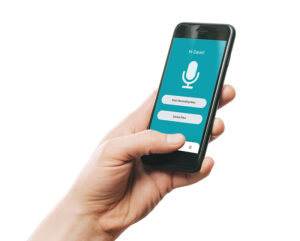
BackupTyping Dictation App built for clients of our specialist property transcription service to use at no charge or licence. Just dictate and send to us at the touch of a button!

What Is Audio Transcription for Chartered Surveyors?

Audio transcription for surveyors is the process of converting spoken dictation into structured written reports. It allows surveyors to record site notes and observations and have them professionally typed into accurate, formatted documents.

This helps surveyors save time, improve accuracy and focus on inspections rather than report writing.

What is audio transcription for surveyors?

Audio transcription plays an essential role in how many chartered surveyors produce their reports - but today, it’s faster and easier than ever to use.

At its simplest, audio transcription is the process of converting spoken dictation into written text. For surveyors, this typically means recording site notes, observations, knowledge and report content, which are then transcribed into a structured document.

A Modern Approach to Dictation 

Traditionally, dictation required a device and a return to the office to upload files. That’s no longer necessary.

With our free mobile phone dictation app, surveyors can:

This allows reports to start being processed almost immediately, saving valuable time.

Flexible Ways to Send Work

We understand that different teams work in different ways. As well as mobile dictation, work can also be submitted:

All submissions feed into our bespoke job management system, ensuring everything is tracked, organised, and delivered efficiently.

The Benefits of Professional Transcription

While automated tools are becoming more common, professional audio transcription still offers clear advantages:

Accuracy with technical terminology

Survey reports often include specialist language and detailed observations that require careful handling.

Structured, readable documents

We don’t just type - we format and structure reports so they are clear and professional.

Consistency across reports

Particularly important for larger firms with multiple surveyors.

Time savings

By removing the need to type and format reports, surveyors can focus on inspections and client work.

Working Alongside AI

Many surveying firms are now exploring AI transcription tools. We are happy to work alongside these - helping refine, correct and format content so it meets professional standards.

Conclusion

Audio transcription is no longer just about typing - it’s about creating an efficient workflow.

With mobile dictation, flexible submission options, and professional document production, surveyors can produce accurate, polished reports with minimal admin time.


BackupTyping has a team of property industry expert audio typists ready to get your documents typed and with our clients when you need them.  We work to your timescale, not you to ours.  From 2 hours to 24 hours - what do YOU need?

Simple, easy, cost effective solution - let us make your working life easy.

Photographic Schedules of Condition: Word vs PowerPoint

Photographic schedules of condition are a key part of building surveying and property documentation, providing a clear visual record of a property at a specific point in time.

When creating these schedules, professionals typically choose between Word and PowerPoint - but which is best for producing a high-quality, professional photographic report?

Word vs PowerPoint for Photographic Schedules

Both Word and PowerPoint can be used to create photographic schedules, but they offer very different levels of control and efficiency.

Why PowerPoint Is Less Suitable

PowerPoint is designed primarily for presentations, not structured reports.

While it allows you to insert images quickly using slide layouts, it has several limitations when used for photographic schedules:

For large schedules, this can become extremely time-consuming and inefficient.

Why Word Is the Preferred Option

Word is far better suited for creating structured photographic schedules of condition.

It allows you to:

Most importantly, Word handles changes far more effectively. If a photo is removed, the document can adjust automatically - saving significant time during revisions.

Key Considerations When Choosing Your Format

Before creating your schedule, it’s important to plan your template carefully:

A well-structured Word template can significantly reduce formatting time and improve overall document quality.

Quick Summary 

Word is generally the better option for photographic schedules of condition because it offers:

PowerPoint is more suitable for presentations but is less efficient for structured report production.

How BackupTyping Can Help

At BackupTyping, we specialise in producing professional photographic schedules of condition for surveyors and property professionals.

Our team can help you:


If you'd like help producing photographic schedules, our team can take care of the entire process for you.


At BackupTyping we have completed hundreds of photo schedules in many different formats and styles and would be happy to chat through which format would suit your needs most.  Let us input your photos and text and here's a good reason why.

BackupTyping is a chartered surveying specialist audio transcription and document production company working with a variety of clients from large corporations to small niche companies, all receiving the same high quality and fast service from a team of audio typists who worked at senior levels in chartered surveying organisations.  Contact - Call:  020 7096 1663 or Email us.

Try us instantly with our FREE dictation app!

BackupTyping Dictation App built for clients of our specialist property transcription service to use at no charge or licence. Just dictate and send to us at the touch of a button!

Speech to Text vs Human Transcription: Why AI Misses the Mark for Surveyors

Do you know your ‘cornicing’ from your ‘corner sink’? Speech to text AI doesn’t

As transcription technology continues to evolve, many surveying professionals are exploring speech to text alternatives. On the surface, AI-driven dictation tools seem like a quick and cost-effective solution.

However, when it comes to property-specific terminology, context matters - and this is where AI often falls short.

We tested several speech to text systems ourselves.

The results were … interesting.

Words like:

In more serious cases, entire phrases or paragraphs were missed entirely.


Why Speech to Text Struggles in Surveying

Speech recognition tools are built to process general language, not specialist surveying terminology.

They often:

Even simple instructions like “full stop paragraph” are often typed exactly as spoken - something no experienced typist would do.


The Problem with “DIY” AI Transcription

While speech to text can be useful in controlled environments, survey reports are rarely simple.

By the time you:

Any time saved is often lost.


Why Human Transcription Still Wins

A professional transcription service understands:

More importantly, they allow you to:

Focus on your work - not the mechanics of typing.


Conclusion

Speech to text technology is improving - but it still has limitations, especially for chartered surveyors producing professional reports.

When accuracy, structure and reliability matter, human transcription remains the superior choice.


If you are a chartered surveyor and need accurate, professionally structured documents quickly, BackupTyping is here to help.

BackupTyping is a chartered surveying specialist audio transcription and document production company working with a variety of clients from large corporations to small niche companies, all receiving the same high quality and fast service from a team of audio typists who worked at senior levels in chartered surveying organisations.  Contact - Call:  020 7096 1663 or Email us.

Try us instantly with our FREE dictation app!

BackupTyping Dictation App built for clients of our specialist property transcription service to use at no charge or licence. Just dictate and send to us at the touch of a button!


Related Articles:

What Is Audio Transcription for Chartered Surveyors?

Fee Earner or Typist? | Why Outsourcing Typing Works

Is Using a Transcription Service Confidential? What You Need to Know

Confidentiality is one of the first concerns businesses have when considering outsourcing transcription.  If you are dictating reports with valuations, client correspondence or sensitive internal information, you need to be confident that your data is handled securely.

The short answer is yes.  A professional transcription service should be fully confidential.  The important part is understanding how that confidentiality is maintained.

Is Transcription Confidential?

A reputable transcription service will treat all client data as strictly confidential.

This applies to:

  • Client reports
  • Survey documentation
  • Legal or HR material
  • Internal business communications

At BackupTyping, confidentiality is a fundamental part of how we operate, not an afterthought.

How Confidentiality Is Maintained

Confidentiality Agreements

All professional transcriptionists should be bound by confidentiality agreements.

At BackupTyping:

  • Every typist signs a confidentiality agreement from day one
  • Confidentiality forms part of our standard working practice
  • Data protection is taken seriously across the entire team

This ensures that all work handled is protected at an individual level.

NDAs (Non-Disclosure Agreements)

Many clients require additional reassurance.  A professional transcription company should be happy to:

  • Sign a Non-Disclosure Agreement (NDA)
  • Work within your company’s confidentiality policies
  • Provide clear terms around data handling

This is particularly important for:

  • Corporate clients
  • HR departments
  • Sensitive or high-value projects

GDPR and Data Protection

In the UK, transcription services must comply with GDPR (General Data Protection Regulation).

This means:

  • Personal data must be handled securely
  • Information must only be used for its intended purpose
  • Data should not be retained longer than necessary
  • Appropriate security measures must be in place

At BackupTyping, we operate in line with GDPR requirements to ensure all client data is processed responsibly and securely.

Is Outsourcing More or Less Secure Than In-House?

Many assume keeping work in-house is safer.  In reality, outsourcing can often be just as secure, if not more so.

With a professional transcription service:

  • Access to documents is controlled
  • Fewer people handle the data
  • Processes are structured and consistent

In contrast, internal handling can sometimes involve:

  • Multiple staff members
  • Shared systems
  • Less formalised processes

The key is choosing a provider you trust.

What About Sensitive Documents?

Transcription services are often used for highly sensitive material, including:

  • HR documentation
  • Disciplinary records
  • Confidential reports
  • Legal or dispute-related content

A professional provider will have experience handling this type of work and will understand the importance of discretion.

Practical Reassurance for Clients

When choosing a transcription service, you should feel confident asking:

  • Do you have confidentiality agreements in place?
  • Can you sign an NDA?
  • How is data handled and stored?
  • Who has access to my files?

A reputable company will answer these clearly and without hesitation.

Confidentiality and Workflow

Confidentiality does not slow the process down.  A typical workflow remains simple and secure:

  1. Dictate your content
  2. Send your file securely
  3. Receive a completed document

All while maintaining strict data protection standards.  For a broader understanding of how transcription fits into your workflow, see audio transcription for chartered surveyors.

Why Trust Matters

Outsourcing transcription is not just about efficiency.  It is about trust.

You need to know that:

  • Your data is handled professionally
  • Your documents are secure
  • Your clients’ information is protected

At BackupTyping, we have worked with property professionals for over 20 years, handling confidential documents every day.

Conclusion

Yes, using a transcription service is confidential when you work with a professional provider.  With confidentiality agreements, NDAs and GDPR compliance in place, your data is handled securely at every stage.  Outsourcing transcription should give you confidence, not concern.

Send us your dictation with confidence.  We will take care of it securely and professionally.

BackupTyping provides a fast, accurate and experienced transcription for property professionals - saving you time and money. Call us on 020 7096 1663 to find out how we can help you.

What Is an Audio Typist? A Guide for Property Professionals

An audio typist is a specialist who converts spoken dictation into professionally formatted written documents.

While the role may sound straightforward, a skilled audio typist does far more than simply type what they hear.

For property professionals and chartered surveyors, an experienced audio typist plays a key role in producing accurate, structured and client-ready reports.

What Does an Audio Typist Do?

An audio typist listens to recorded dictation and types it into a clear, formatted document.

This typically includes:

The process involves listening through headphones while controlling audio playback using a foot pedal, allowing for continuous and efficient typing.

How Audio Typing Works

Professional audio typists use specialist transcription software and equipment.

The setup usually includes:

This allows the typist to maintain a steady flow of dictation while typing accurately and efficiently.  It is a skill that takes time to develop and refine.

Why Use a Professional Audio Typist?

Accuracy and Understanding

An experienced audio typist does not just type words.  They understand context, terminology and meaning.  This is particularly important in the property industry, where technical language must be accurate.

Speed and Efficiency

A professional audio typist can work significantly faster than someone typing their own documents.  This allows reports and documents to be produced quickly without compromising quality.

Professional Formatting

Audio typists ensure documents are:

This removes the need for additional formatting later.

Reduced Admin Workload

By outsourcing audio typing, professionals can focus on inspections, clients and fee-earning work instead of administrative tasks.  If you are currently typing your own reports, it is worth considering whether that time could be better spent.  See our article on fee earner or typist for a practical breakdown.

Audio Typist vs Speech-to-Text

Speech-to-text technology is often seen as an alternative, but it works differently.

Speech-to-text:

A professional audio typist:

For client-facing documents, accuracy and presentation are critical.

Why Industry Experience Matters

Not all audio typists are the same.

A typist with experience in the property sector will:

This reduces errors and improves turnaround time.

At BackupTyping, our team has extensive experience working within the property industry, allowing us to produce high-quality documents without the need for explanation or correction.

How Audio Typing Fits into Your Workflow

A typical workflow looks like this:

  1. Dictate your notes or report
  2. Send the audio file
  3. Receive a fully formatted document

This process removes the need for any property professional to type, format or rework documents.

For a broader overview of how this works, read our guide to audio transcription for chartered surveyors.

Conclusion

An audio typist is not just someone who types.

They are a skilled professional who:

For property professionals, this can significantly improve efficiency and reduce administrative workload.

We are a team who are always here – 24 hours a day, 7 days a week – ready and waiting to provide you with the efficient service you need when you need it.

BackupTyping provides a fast, accurate and experienced transcription for property professionals - saving you time and money. Call us on 020 7096 1663 to find out how we can help you.

What Is Transcription? A Complete Guide for Property Professionals

Transcription is a simple concept, but in practice it plays a critical role in how many businesses operate.  If you dictate notes, reports or correspondence, transcription is what turns those spoken words into structured, usable documents.

For property professionals and surveyors, it is often the difference between a slow, admin-heavy workflow and an efficient, streamlined one.

What Is Transcription?

Transcription is the process of converting spoken audio into written text.

In a business context, this typically involves:

  • Dictating reports or notes
  • Recording meetings or site observations
  • Converting audio into a structured document

The final output is not just text.  It is usually:

  • Formatted
  • Proofread
  • Ready to send or use

For a more practical overview of how this works in your industry, see our guide to audio transcription for chartered surveyors.

How Transcription Works in Practice

The process is straightforward:

  1. Dictate your content using a phone, app, or recorder
  2. Send the audio file
  3. A professional transcriptionist types and formats the document
  4. You receive a completed, ready-to-use document

No need to type.  No need to format.

Types of Transcription

1. Audio Transcription

This is the most common type.

Used for:

  • Reports
  • Letters
  • Site notes
  • General correspondence

2. Meeting Transcription

Used when:

  • Recording Teams or Zoom meetings
  • Creating written records of discussions

3. Copy Typing

Not strictly transcription, but closely related.

This involves:

  • Converting handwritten or typed documents
  • Reformatting existing files into professional layouts

Who Uses Transcription Services?

Transcription is widely used across industries, but particularly by:

Property Professionals and Surveyors

  • Site inspections generate large volumes of notes
  • Reports need to be structured and accurate
  • Time is better spent on inspections than typing

Businesses with Regular Documentation

  • Letters
  • Reports
  • Internal documentation

Teams with Limited Admin Capacity

  • Busy periods create backlogs
  • Outsourcing provides flexibility

Why Not Just Type It Yourself?

Most professionals can type but the real question is ... is it the best use of your time?

Typing documents yourself:

  • Takes significantly longer
  • Interrupts your workflow
  • Reduces time spent on core work using your professional knowledge

If you are weighing this up, it is worth reading fee earner or typist to understand the real cost of doing it yourself.

Transcription vs Speech-to-Text

Speech-to-text tools are becoming more common but they are not the same as professional transcription.

Speech-to-Text:

  • Fast
  • Low cost
  • Often requires editing

Professional Transcription:

  • Accurate
  • Properly formatted
  • Ready to use

Speech-to-text can be useful for quick notes but for structured, client-facing documents, it often requires significant correction.

The Benefits of Professional Transcription

Using a transcription service provides:

Time Savings: Dictation is significantly faster than typing.

Accuracy: This is especially important for technical terminology.

Professional Formatting: Documents are structured, consistent, and ready to send.

Flexibility: You can scale up or down depending on workload.

Reduced Admin Pressure: This frees up both professionals and admin staff.

How Transcription Fits into a Modern Workflow

Today, transcription is part of a much more efficient process.

With mobile dictation:

  • Record on-site
  • Send instantly
  • Receive documents quickly

No need to return to the office and no delays in getting reports started.

Common Misconceptions

“It’s just typing”

Transcription involves:

  • Listening carefully
  • Understanding context
  • Applying formatting
  • Producing structured documents

“It’s expensive”

In reality:

  • You only pay for what you use
  • It often saves money by freeing up higher-value time

“Speech-to-text does the same thing”

It does not account for:

  • Context
  • Formatting
  • Accuracy in real-world conditions

Conclusion

Transcription is more than converting speech into text.

It is a way to:

  • Save time
  • Improve efficiency
  • Produce professional documents
  • Reduce admin workload

For property professionals, it is often a key part of working more effectively.

If you are dictating but still typing your own work or relying on inconsistent processes, BackupTyping can help.  Send your dictation today and receive a fully formatted document in return.

BackupTyping is here to provide you with the best transcription service possible when you need it.

BackupTyping provides a fast, accurate and experienced transcription for property professionals - saving you time and money. Call us on 020 7096 1663 to find out how we can help you.

Can I dictate on my mobile phone?

Well it depends on what you are looking for as they all effectively do the primary thing that is needed and that’s make recordings, it just depends on what else you want it to do.

Possibly the first consideration is handheld or an app on your smartphone.

The main things to consider before deciding are:

Security

Using a mobile app isn’t a secure way to dictate and share documents to your audio typing company unless you’re using an encrypted paid for service. Free recording apps, Siri and so on don’t protect your data. However, a handheld device means (99% of certified devices) are encrypted or PIN protected or both – super safe.

Battery life

If you rely on your Smartphone to take and receive calls, compose and check emails, take photos for work purposes as well as dictate reports to your audio typist – you might find your phone is needing constant re-charging. Using a dedicated device means your phone can take a break between all of its other tasks. A dedicated device also has a superior battery life in comparison to a smartphone.

Need your dictation urgently

With an app-based system, you also have the benefit of being able to send your files immediately either to your secretary or outsource typing facility to enable your dictation to be transcribed immediately rather than needing to wait to ‘dock’ back in the office. Some hand-held devices also now have Wi-Fi capabilities so this is no longer the domain only of the smartphone app.

There is of course benefits to using an app – including but not limited to:

Only needing to carry one device as opposed to multiple.

A dedicated device may be slight overkill for someone who doesn’t dictate very often.

Equally, if you are dictating very long files you would need to keep an eye on the battery life.

If you’ve made the decision to opt for a handheld device now you face the task of trying to figure out which of the dozens of machines is the right one for you so check out our article 'Which dictation machine is the best?'

BackupTyping provides a fast, accurate and experienced transcription service for property professionals - saving you time and money. Call us on 020 7096 1663 to find out how we can help you.

How to Dictate Well – Your Typist Will Thank You!

How to dictate for business is rarely taught but is a real skill and just takes a little practice for great rewards.

Once it is mastered you will love it.

It can make your life easier and free up time wasted doing tasks that can be done for you (no doubt quicker and maybe even better).

Your typist should be an expert at Word and Excel as a minimum – you don’t have to be!

Benefits of dictating well

A ‘pick and peck’ typist will achieve (on average) 20 words per minute.

A professional typist can exceed 100wpm – meaning it can be up to 5 times faster than trying to type yourself.

At around 20wpm, a 3,000 word or roughly 6 page word report will take a minimum of 2.5 hours.  Dictating this will take 30 minutes.

The faster you can create a document, the more you can do in a day.

See our article on Why dictate? I can just type it myself!

How to dictate for your audio typist

Make sure your dictation machine is charged and you are familiar with the record and pause buttons (pop some spare batteries in your briefcase too).

Know how to download your speech file once you have finished dictating so it can be typed.

1. Ensure ‘rec’ has started before speaking.

2. Take care when pressing Pause and Record so you do not 'clip' the first or last words of a sentence.
This is a common problem and can mean you don't get accurate documents back!
Try taking a short breath after pressing record and before starting to talk.

3. Use the pause not stop button – this will just pause the file you are working on while you consider what to say next.  Stop may well start another file which is going to be annoying later.

4. Hold the dictation machine about two inches away from mouth to get the clearest speech.

5. Don't turn your head away from the microphone while speaking as your voice will fade in and out.

6. Don't rustle through papers while speaking – it’s just harder to hear exactly what you are saying.

7. Speak clearly but don’t change your normal speech pattern – just speak at a normal pace and level.  Fast dictation won't get your typing done any quicker (and could slow it down) and it may make your typist shed a tear or two.

8. Enunciate numbers clearly – 13 and 30 are very different numbers – say “thirteen one three” or “thirty-three zero”.

9. Spell any unusual names/words - Llanfairpwllgwyngyllgogerychwyrndrobwllllantysiliogogogoch "L for Lima, L for Lima, A for Apple, N for November, you get the point.

10. Do speak with emotion in your voice. A monotone voice tends to put typists to sleep.

11. Remember to pause recording when thinking for a while or taking a telephone call.

12. Heavy wind can drown out your dictation - consider using a specialist dictation machine with a microphone facility that removes this (contact BackupTyping for advice on this). Or turn your back to the wind. 

13. Consider background noise so you get the best-typed document back. A professional typist can handle a lot though - you definitely don't have to sit in silence.

14. Please do not eat while dictating. Just no, it’s not nice.

15. Do not dictate while driving. It's dangerous and the sound quality is usually poor.

Practice on your own in a quiet room until you feel confident with your recording machine.  Don’t feel like you have to whisper, just talk as if you were on the telephone.

While you get comfortable with dictating consider before you start talking about what you would like to cover in your document.  It’s nice and easy to start by dictating the name and address of the recipient and “Dear Whoever”, “subject line”, “thank you for your letter of…” and then you are on your way.

Whether you have an in-house typist or work with a company like BackupTyping providing a transcription service, remember there is a real person who will be doing your typing, so it’s kind of nice to start your dictation with ‘Hello, Mark here, dictating on Monday’.  It is easier to imagine you are talking to ‘somebody’ rather than a machine.

BackupTyping provides a fast, accurate and experienced transcription for property professionals - saving time and money. Call us on 020 7096 1663 to find out how we can help you.

Who needs a transcription service?

If you dictate notes, reports, or correspondence, then you already rely on transcription whether you realise it or not.

The real question is not whether you need a transcription service ... it’s whether you are using your time efficiently.

What Is a Transcription Service?

A transcription service converts spoken words into professionally formatted written documents.  For a more detailed breakdown, see our guide to audio transcription for chartered surveyors.

For property professionals and chartered surveyors, this typically includes:

Instead of typing everything yourself, you dictate and a professional audio typist produces the final document.


Who Actually Needs a Transcription Service?

1. Professionals Who Dictate Regularly

If you are already dictating into:

Then you are already halfway there.

Typing your own dictation removes the biggest benefit - time saving.

2. Chartered Surveyors and Property Professionals

Surveyors spend a large part of their day:

Typing reports is not the best use of that time.

A transcription service allows you to:

Without returning to the office to type.

3. Businesses Experiencing Capacity Issues

Workloads are rarely consistent.

During busy periods:

Outsourcing transcription gives you:

4. Teams with In-House Secretaries

A common assumption is "our secretary can type it”

But in reality secretaries are responsible for:

Typing large volumes of dictation can reduce their effectiveness elsewhere.

A transcription service allows:
Secretaries to focus on higher-value tasks
Typing to be handled efficiently in the background

5. Anyone Who Wants to Work More Efficiently

Even if you can type your own work you should ask is it the best use of your time?

For example:

That time difference adds up quickly.

If you've ever wondered how much time (and money) typing actually costs, read fee earner or typist?.


Why Not Just Use Speech-to-Text?

Speech-to-text tools can work for simple tasks.  However, they often struggle with:

This leads to:

Which removes much of the “time saving”.


The Real Value of a Transcription Service

A professional transcription service doesn’t just type, it provides:

And most importantly it allows you to focus on your core work.


A Simple Workflow

Working with a transcription service is straightforward:

  1. Dictate
  2. Send your file
  3. Receive a completed document

Conclusion

Anyone who dictates can benefit from a transcription service.

But for professionals - especially in the property sector - the real advantage is not just convenience.

It’s efficiency
It’s cost-effectiveness
It’s better use of time


If you are currently typing your own reports or struggling to keep up with admin send us your dictation today - we’ll take care of the rest.

BackupTyping provides a fast, accurate and experienced transcription for property professionals - saving you time and money.  Call us on 020 7096 1663 to find out how we can help you. 


Further Reading: