Can I dictate on my mobile phone?

Well it depends on what you are looking for as they all effectively do the primary thing that is needed and that’s make recordings, it just depends on what else you want it to do.

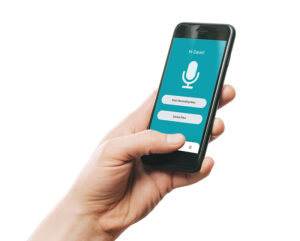
Possibly the first consideration is handheld or an app on your smartphone.

The main things to consider before deciding are:

Security

Using a mobile app isn’t a secure way to dictate and share documents to your audio typing company unless you’re using an encrypted paid for service. Free recording apps, Siri and so on don’t protect your data. However, a handheld device means (99% of certified devices) are encrypted or PIN protected or both – super safe.

Battery life

If you rely on your Smartphone to take and receive calls, compose and check emails, take photos for work purposes as well as dictate reports to your audio typist – you might find your phone is needing constant re-charging. Using a dedicated device means your phone can take a break between all of its other tasks. A dedicated device also has a superior battery life in comparison to a smartphone.

Need your dictation urgently

With an app-based system, you also have the benefit of being able to send your files immediately either to your secretary or outsource typing facility to enable your dictation to be transcribed immediately rather than needing to wait to ‘dock’ back in the office. Some hand-held devices also now have Wi-Fi capabilities so this is no longer the domain only of the smartphone app.

There is of course benefits to using an app – including but not limited to:

Only needing to carry one device as opposed to multiple.

A dedicated device may be slight overkill for someone who doesn’t dictate very often.

Equally, if you are dictating very long files you would need to keep an eye on the battery life.

If you’ve made the decision to opt for a handheld device now you face the task of trying to figure out which of the dozens of machines is the right one for you so check out our article 'Which dictation machine is the best?'

BackupTyping provides a fast, accurate and experienced transcription service for property professionals - saving you time and money. Call us on 020 7096 1663 to find out how we can help you.

Which dictation machine is the best?

Which dictaphone should you buy?

If you’ve made the decision to opt for a handheld device, you now face the task of trying to figure out which of the dozens of machines is the right one for you.

Best dictation machine for a technophobe

Philips DPM6000

Lots of dictation users don’t want complex devices – simply a slide switch ready to go and the ability to dock and move on with their day. This is the device for them! Of course, you can edit and amend dictations in the device as you would expect. But for something which does what it says on the tin and is easy to use out of the box – this is the one. Also included in the box you receive a pouch to keep the device protected and the rechargeable battery for extended battery life.

Alternative models:
Philips: DVT7110 | Olympus: DS-2600

Best dictation machine for on the go

Olympus DS9500

A lightweight recorder with integrated Wi-Fi capability meaning you can dictate and send files on the go. Fits nicely into a pocket or bag due to it’s slim build, while you benefit from real-time updates on your pending dictations on the device thanks to the Wi-Fi. Once you’re back in the office, dock it and charge it to go again tomorrow!


Best dictation machine for high volume use

Philips DPM8000

3D mic system, large colour display and light & motion sensors inbuilt for extended battery life. This Premium device benefits from the integrated slide switch (slide switch configuration is model dependent) and is designed with the ultimate dictation user in mind. The device also boasts file encryption and device PIN lock for high data security.


Best dictation machine for every now and then

Olympus DS-2600

As Olympus say themselves, the DS-2600 is the ideal device for your personal efficient one-to-one workflow. With the continuing slide switch theme included as well as high quality crisp recordings created on the device, this makes it a great fit to sit on the desk of someone who wouldn’t usually dictate every day. Equally it’s capable for the busy professional who’s reliant on top quality recordings. It’s a strong all-rounder!


Best dictation machine for dictating in bad weather conditions

(for example standing on top of a roof)

Philips: DVT7110

See the source image

Philips have a device which comes with a windbreaker (the grey fluffy mic) which is designed to remove noise such as wind Philips DVT7110. There is nothing worse for a typist then trying to transcribe a file with a gale blowing into the microphone as it makes it more or less impossible to hear, no typist wants to return work incomplete because of bad weather.


For advice and prices please contact BackupTyping and together with our partner ORdigiNAL will offer the best dictation machine advice for your organisation. Contact us on 020 7096 1663 or use the button below to find out which really is the best system for you.

BackupTyping provides a fast, accurate and experienced transcription for property professionals - saving you time and money.

Why dictate? I can type it myself!

We hear this from the younger members of staff at organisations that we work with.

But could they be missing the bigger picture? After all that studying, is it the best use of time to spend hours typing up reports? Is that adding the best value to the company?

A ‘pick and peck’ typist will achieve (on average) 20 words per minute.

Professional audio typists can exceed 100 wpm – meaning it can be up to 5 times faster than trying to type yourself.

At around 20 wpm, a 3,000 word or roughly 6-page word report will take a minimum of 2.5 hours.  Dictation will take 30 minutes.

The faster you can create a document, the more you can do in a day.

We realise that starting to dictate can be a little awkward but it is really is worth taking the time to practice.

See our article titled How dictation is completed well – your typist will thank you! which gives all the information needed to bear in mind when dictating – there isn’t really a lot to it but it is a skill that takes a bit of practice and is really worth it.

The property professional can then, for example, while on-site dictate an inspection report, possibly multiple in one day, and then send them to be typed straight afterwards – by a professional audio typist who will type it quickly and accurately and in the right format.

You don’t need to be a Word expert because your transcription service already is.

You then get your documents back and send them to your client in the quickest time possible enabling you to get on with the next fee-earning task.

We believe it really is a no brainer.

BackupTyping provides a fast, accurate and experienced transcription for property professionals - saving you time and money. Call us on 020 7096 1663 to find out how we can help you.

How to Dictate Well – Your Typist Will Thank You!

How to dictate for business is rarely taught but is a real skill and just takes a little practice for great rewards.

Once it is mastered you will love it.

It can make your life easier and free up time wasted doing tasks that can be done for you (no doubt quicker and maybe even better).

Your typist should be an expert at Word and Excel as a minimum – you don’t have to be!

Benefits of dictating well

A ‘pick and peck’ typist will achieve (on average) 20 words per minute.

A professional typist can exceed 100wpm – meaning it can be up to 5 times faster than trying to type yourself.

At around 20wpm, a 3,000 word or roughly 6 page word report will take a minimum of 2.5 hours.  Dictating this will take 30 minutes.

The faster you can create a document, the more you can do in a day.

See our article on Why dictate? I can just type it myself!

How to dictate for your audio typist

Make sure your dictation machine is charged and you are familiar with the record and pause buttons (pop some spare batteries in your briefcase too).

Know how to download your speech file once you have finished dictating so it can be typed.

1. Ensure ‘rec’ has started before speaking.

2. Take care when pressing Pause and Record so you do not 'clip' the first or last words of a sentence.
This is a common problem and can mean you don't get accurate documents back!
Try taking a short breath after pressing record and before starting to talk.

3. Use the pause not stop button – this will just pause the file you are working on while you consider what to say next.  Stop may well start another file which is going to be annoying later.

4. Hold the dictation machine about two inches away from mouth to get the clearest speech.

5. Don't turn your head away from the microphone while speaking as your voice will fade in and out.

6. Don't rustle through papers while speaking – it’s just harder to hear exactly what you are saying.

7. Speak clearly but don’t change your normal speech pattern – just speak at a normal pace and level.  Fast dictation won't get your typing done any quicker (and could slow it down) and it may make your typist shed a tear or two.

8. Enunciate numbers clearly – 13 and 30 are very different numbers – say “thirteen one three” or “thirty-three zero”.

9. Spell any unusual names/words - Llanfairpwllgwyngyllgogerychwyrndrobwllllantysiliogogogoch "L for Lima, L for Lima, A for Apple, N for November, you get the point.

10. Do speak with emotion in your voice. A monotone voice tends to put typists to sleep.

11. Remember to pause recording when thinking for a while or taking a telephone call.

12. Heavy wind can drown out your dictation - consider using a specialist dictation machine with a microphone facility that removes this (contact BackupTyping for advice on this). Or turn your back to the wind. 

13. Consider background noise so you get the best-typed document back. A professional typist can handle a lot though - you definitely don't have to sit in silence.

14. Please do not eat while dictating. Just no, it’s not nice.

15. Do not dictate while driving. It's dangerous and the sound quality is usually poor.

Practice on your own in a quiet room until you feel confident with your recording machine.  Don’t feel like you have to whisper, just talk as if you were on the telephone.

While you get comfortable with dictating consider before you start talking about what you would like to cover in your document.  It’s nice and easy to start by dictating the name and address of the recipient and “Dear Whoever”, “subject line”, “thank you for your letter of…” and then you are on your way.

Whether you have an in-house typist or work with a company like BackupTyping providing a transcription service, remember there is a real person who will be doing your typing, so it’s kind of nice to start your dictation with ‘Hello, Mark here, dictating on Monday’.  It is easier to imagine you are talking to ‘somebody’ rather than a machine.

BackupTyping provides a fast, accurate and experienced transcription for property professionals - saving time and money. Call us on 020 7096 1663 to find out how we can help you.

Why use a transcription/audio typing service?

At BackupTyping, as a nationwide property specialist transcription service provider, we often speak to potential clients about why a company should use a transcription service.

Some are already familiar with the concept and are aware of the benefits of outsourcing typing but others would really like to know why it would work for them.

Outsourcing your typing using a transcription service works quite differently from taking on a member of staff – no space required, no employment costs and no training.

Why?

Vested Interest An outsource transcription company is going to be invested in your business, as your success allows their success.

Confidentiality Remember to check the confidentiality agreement of your transcription service as this is vital and means that HR documents can also be outsourced to retain confidentiality in-house.

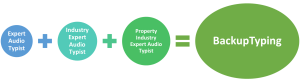
Specialist We recommend using a specialist transcription service for your market sector as it means you will be plugging into a provider who knows your business, understands your terminology and doesn’t need any training.

We are market specialists for all areas of the property from chartered surveyors and architects to building construction organisations.

There probably isn’t much you could say that we would have to think twice about.

There are many transcription providers for other industries, however, at BackupTyping we are property focused, and familiar with the terminology and the types of documents property professionals produce.

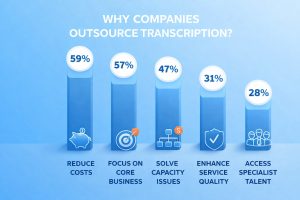
Whichever company you choose, outsourcing your audio typing will support growth for your organisation in a cost-effective manner.

Overall, using an outsource transcription service can save you money, increase productivity and staff motivation, and an out of hours service will enable you to never miss a deadline.

Transcription companies just type, make sure your service is carried out by real human beings with a knowledge of your sector to get the best possible service – you should be getting accurately typed documents in a timeframe that suits you, in your branded style from a flexible and experienced company where no job is ever too big or too small!

BackupTyping provides a fast, accurate and experienced transcription for property professionals - saving you time and money. Call us on 020 7096 1663 to find out how we can help you.

Which Transcription Service? Specialist versus Non-Specialist

If you’ve looked into outsourcing transcription, you will have come across a wide range of providers.  Some cover multiple industries. Others specialise in just one.

So, which is the better option?

What Is a Specialist Transcription Service?

A specialist transcription service focuses on one particular industry and understands it well.

For example:

This means they are familiar with:

They do not need to learn as they go.

Why Industry Knowledge Matters

Transcription is not just about typing words it also involves understanding what is being said.

In the property sector, this can include:

A specialist transcription service will recognise these immediately - they will know what you mean without needing clarification, which makes the process quicker and more accurate.

Risks of Using a Non-Specialist

A non-specialist service may still be able to type your dictation, but there can be drawbacks.

These include:

This is something we see regularly when clients switch to us.  Often, the document has been typed correctly in parts but lacks the consistency and understanding needed for professional use.

If you are unsure what goes into producing a well-structured document, it is worth understanding the role of an audio typist and how much more is involved than simply typing.

Benefits of a Property-Focused Transcription Service

Using a specialist service in your industry offers clear advantages.

Accuracy from the Start: There is no need to explain terminology or correct misunderstandings.

Consistent Document Quality: Reports are formatted correctly and follow expected structures.

Faster Turnaround: Less time is spent questioning or second-guessing content.

Easier Workflow: You can dictate naturally, without worrying about how something could be interpreted.

At BackupTyping, our team has worked within the property industry for many years and we understand the types of documents you produce and the standards expected, which allows us to deliver work that is ready to use.

How to Choose the Right Transcription Provider

When selecting a transcription service, consider:

Choosing the right provider from the start will save time and avoid frustration later.

Conclusion

While many transcription services can type your dictation, not all will understand it.

A specialist transcription service offers greater accuracy, consistency and efficiency, particularly in technical industries such as property.  If you are looking for a reliable solution that fits seamlessly into your workflow, working with a specialist provider makes a clear difference.

For a broader understanding of how this fits into your day-to-day work, see our guide to audio transcription for chartered surveyors.

If you are preparing property reports and considering outsourcing transcription - you need a service that understands your industry, BackupTyping can help.  Send us your dictation and see the difference a specialist service can make.

BackupTyping provides a fast, accurate and experienced transcription for property professionals - saving you time and money. Call us on 020 7096 1663 to find out how we can help you.

Human Transcription Service versus Speech Recognition

Not gonna lie, we may be a bit biased on this one! However, we really do believe that nothing beats the personal touch when having your documents typed.

Speech Recognition

Speech recognition certainly has improved greatly over the years since its inception and, to be fair, it does work very well for some documents.

Speech recognition will do a pretty good job at a plain document without formatting, but it does need to be thoroughly checked by the dictator as without the sentience of a human being it is going to literally type what you say, which can be annoying and/or amusing.

Human Transcription Service

On the other hand, a human transcriber is going to be thinking while listening to your speech.

If you are using the right transcriber with knowledge in your industry, understanding is going to be easy without any strange misinterpretations.

At BackupTyping you are working with real people who understand your work.

We know what you’re talking about, we will add grammar so you don’t have to dictate it, we will format documents as we go along which cuts out extra time at the end, we will make sense of what you are saying in case you get a bit lost while dictating, we will remember you are talking about 50,000 sq ft and not 15,000 sq ft.

It will be just like having an in-house typist who is going to put thought into the documents being prepared using your templates.

Sadly, speech recognition cannot do all that for you, so choose the right transcription service for your industry and enjoy the benefits of having a human type your documents.

Our experienced transcription typist professionals have all these skills and can ensure that you always receive the best and most accurate piece of work possible – a machine really can’t provide a service like that!


BackupTyping provides a fast, accurate and experienced transcription service for property professionals - saving you time and money.

Call us on 020 7096 1663 to find out how we can help you.

Can I record Microsoft Teams meeting?

With the new way of working and meetings needing to be conducted virtually, the use of Microsoft Teams has skyrocketed as we are no longer able to sit down around a table.

By now everyone knows the advantages of using Teams rather than a conference call but did you know you can record your meeting?

Obviously this is great to give you a reminder of what was said but where this facility really comes into its own is if the meeting needs to be transcribed.

Whilst typists are used to having a dictaphone placed in the middle of a meeting, the record button pressed and everyone talking, problems would often be encountered with being unable to distinguish one speaker from another especially with similar accents.

Ask any typist and they’ve all encountered this, and it can be frustrating as we want to make a complete record of that meeting.

But with Teams, being able to see the individual participants is a godsend as we can match a voice and face, and ensure an accurate account of the meeting.

To start recording, go to the meeting controls and select More options - Start recording.

To stop recording, go to the meeting controls and select More options - Stop recording.

The recording is then processed and saved to SharePoint if it was a channel meeting or OneDrive if it was any other type of meeting.

Note: guests and external attendees can only view the recording if it’s explicitly shared with them.

Microsoft Teams is able to be transcribed via Express Scribe with the video recording, though sadly not with Olympus software. So, if you need a meeting to be transcribed you need to ensure your typist has Express Scribe (which we do at BackupTyping). The meetings can be played back with a media player but this does not give you the ability to stop and start, which Express Scribe does.

BackupTyping provides a fast, accurate and experienced transcription for property professionals - saving you time and money. Call us on 020 7096 1663 to find out how we can help you.

Who needs a transcription service?

If you dictate notes, reports, or correspondence, then you already rely on transcription whether you realise it or not.

The real question is not whether you need a transcription service ... it’s whether you are using your time efficiently.

What Is a Transcription Service?

A transcription service converts spoken words into professionally formatted written documents.  For a more detailed breakdown, see our guide to audio transcription for chartered surveyors.

For property professionals and chartered surveyors, this typically includes:

Instead of typing everything yourself, you dictate and a professional audio typist produces the final document.


Who Actually Needs a Transcription Service?

1. Professionals Who Dictate Regularly

If you are already dictating into:

Then you are already halfway there.

Typing your own dictation removes the biggest benefit - time saving.

2. Chartered Surveyors and Property Professionals

Surveyors spend a large part of their day:

Typing reports is not the best use of that time.

A transcription service allows you to:

Without returning to the office to type.

3. Businesses Experiencing Capacity Issues

Workloads are rarely consistent.

During busy periods:

Outsourcing transcription gives you:

4. Teams with In-House Secretaries

A common assumption is "our secretary can type it”

But in reality secretaries are responsible for:

Typing large volumes of dictation can reduce their effectiveness elsewhere.

A transcription service allows:
Secretaries to focus on higher-value tasks
Typing to be handled efficiently in the background

5. Anyone Who Wants to Work More Efficiently

Even if you can type your own work you should ask is it the best use of your time?

For example:

That time difference adds up quickly.

If you've ever wondered how much time (and money) typing actually costs, read fee earner or typist?.


Why Not Just Use Speech-to-Text?

Speech-to-text tools can work for simple tasks.  However, they often struggle with:

This leads to:

Which removes much of the “time saving”.


The Real Value of a Transcription Service

A professional transcription service doesn’t just type, it provides:

And most importantly it allows you to focus on your core work.


A Simple Workflow

Working with a transcription service is straightforward:

  1. Dictate
  2. Send your file
  3. Receive a completed document

Conclusion

Anyone who dictates can benefit from a transcription service.

But for professionals - especially in the property sector - the real advantage is not just convenience.

It’s efficiency
It’s cost-effectiveness
It’s better use of time


If you are currently typing your own reports or struggling to keep up with admin send us your dictation today - we’ll take care of the rest.

BackupTyping provides a fast, accurate and experienced transcription for property professionals - saving you time and money.  Call us on 020 7096 1663 to find out how we can help you. 


Further Reading: